

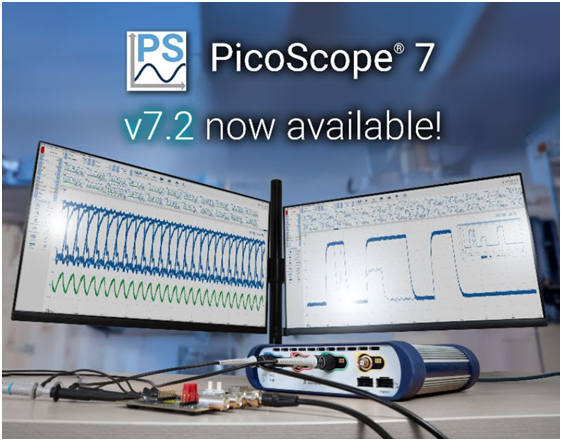
PicoScope 7 Software version 7.2 has been released. This significant update introduces powerful new features and enhancements designed to improve waveform capture, analysis and measurement confidence, making the control of PicoScope instruments faster, clearer and more efficient for engineers and technicians worldwide.
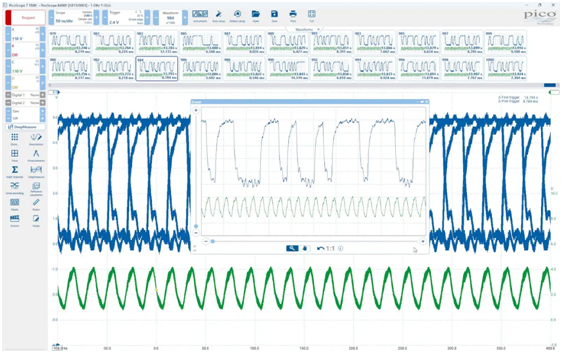
The new features in PicoScope 7.2 incorporate suggestions from the PicoScope user community, alongside innovative thinking from Pico Technology’s engineering team, to address the practical challenges faced in electronic test and measurement.
Key Features in PicoScope 7.2
“We couldn’t wait until the end of the year to deliver these features,” commented Trevor Smith, Product Manager at Pico Technology. “PicoScope 7.2 is our early Christmas present to PicoScope users around the world! We’ve listened closely to our community and built tools like Waveform Overlays and Advanced Serial Filtering to turn tedious tasks into instant insights.”
Waveform overlays for intermittent glitch detection
PicoScope 7.2 introduces Waveform Overlays, a powerful visualization tool that displays multiple waveform captures stacked on top of each other in a single view. This feature effectively creates a visual “envelope” of a signal’s normal behavior, enabling users to drill down to view details of intermittent glitches, jitter and anomalies that might be missed in traditional single-shot views. This is analogous to an advanced digital persistence display, providing unparalleled clarity for signal integrity analysis.
Advanced serial filtering for rapid data identification
The new Serial decoding Advanced Filters tool dramatically reduces the time spent sifting through long serial data captures. This feature allows users to easily set up filters to identify specific packets, data types or indexed date ranges of interest based on criteria such as data length or specific content. Crucially, this advanced filtering works seamlessly across all 40 serial protocols supported by PicoScope 7.
Measurement indicators for complete confidence
To ensure clarity and foster complete trust in measurement results, PicoScope 7.2 includes Measurement Indicators. These clear visual markers are placed directly on the waveform, highlighting the precise “decision points” PicoScope uses for its automatic measurement calculations (e.g., rise time, frequency). This eliminates guesswork, allowing users to see exactly where values are derived.
Enhanced time-stamping capabilities
The software now features displayable and saveable Capture Timestamps (the date and time the waveform buffer was received by the PC, to the resolution of the host PC clock, typically some tens of milliseconds). Furthermore, for PicoScope 3000E and 6000E Series, precise Trigger Timestamps are available, allowing for high-resolution delay measurement between events relative to the first or previous waveform, with resolution down to 200 ps, depending on instrument settings. Timestamp times are recorded by default and can now be exported to a .csv file for detailed reporting and integration with other analysis tools.
Additional workflow enhancements
PicoScope 7.2 includes a host of smaller, but significant, improvements to streamline the user experience:
- Smarter Actions: The Pass/Fail limit system has been enhanced, allowing users to set up Actions (e.g., saving a file) to trigger based on limits for specific measurements.
- Channel Deskew: A new feature has been added to easily compensate for timing differences caused by probes with different cable lengths, ensuring perfectly aligned multi-channel measurements.
- Precise control: Users can now make coarse and fine adjustments (by pressing the shift key while scrolling the mouse wheel) when entering values in settings control boxes. Available now in PicoScope 7.2 for Windows, and coming soon for Mac and Linux users.
- Fresh start: A convenient Default setup button has been added to the top toolbar for quickly restoring factory settings.
PicoScope 7.2 is available immediately as a free update for all existing and new users of PicoScope instruments on Windows, macOS, and Linux operating systems.
Download PicoScope 7.2: https://www.picotech.com/downloads